
Download BootIt Collection – partition management, disk imaging, multi-boot, MBR, GPT, boot manager, disk tools, system utility, bootable media, disk partitioning
Overview
BootIt Collection is a system utility designed to provide advanced tools for managing disk partitions and enabling multi-boot environments. Tailored for users who need to handle complex disk configurations, the application supports a wide range of disk types, including MBR, EMBR, and GPT, ensuring compatibility with both legacy and modern systems. Its primary purpose is to simplify tasks such as partition resizing, conversion between disk formats, and full disk imaging, which are typically complex and risky when performed through standard OS tools.
The software is especially beneficial for power users, system administrators, and IT professionals managing multiple operating systems on a single machine. It also serves as a valuable resource for those planning to upgrade hardware or migrate data between drives. By offering non-destructive operations and secure data recovery options, BootIt Collection helps prevent data loss during system reconfigurations. The tool is designed to run from bootable media, eliminating the need for installation and allowing direct access to disk management functions without relying on the host operating system.
Developed by TeraByte Unlimited, the application reflects a long-standing commitment to providing reliable system utilities. Although specific developer background details were not provided, the consistent release of advanced disk management tools suggests a focus on technical precision and user control. In the broader app ecosystem, BootIt Collection fills a niche for users who require a standalone, robust solution for disk-level operations beyond what standard utilities offer.
Key Features & Functionality
- Advanced Partition Management: Enables non-destructive resizing, creation, and deletion of partitions across MBR, EMBR, and GPT disk types. Supports hard drives exceeding 16 exabytes, offering scalability for large storage environments.
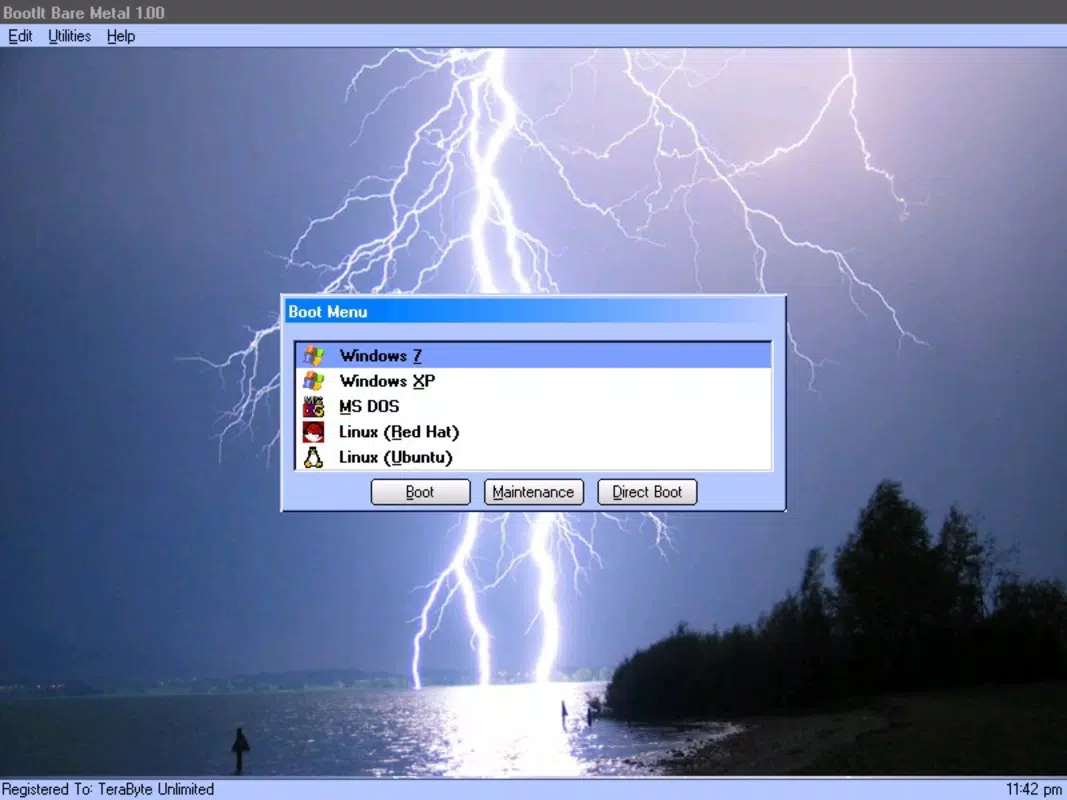
- Multi-Boot Flexibility: Allows users to boot multiple operating systems from separate partitions or even from a single partition, with the ability to selectively load only required systems for isolation and efficiency.
- Robust Disk Imaging: Includes TeraByte's Image for DOS and UEFI, enabling full disk image creation and restoration. Compatible with Image for Windows and Linux files, supporting cross-platform data migration and recovery.
- User-Friendly Interface: Features a mouse-driven graphical interface that simplifies complex tasks. Designed to be self-contained and bootable, requiring no OS installation for immediate use.
- Security and Customization: Offers secure customization options, including user ID and password protection for specific partitions, enhancing data security and access control.
For example, a system administrator can use BootIt Collection to resize a partition without data loss while preparing for a dual-boot setup. A user upgrading from an old SSD to a larger drive can create a complete disk image, transfer it, and restore it with minimal downtime. The ability to convert between MBR and GPT formats without data loss is particularly useful when preparing drives for UEFI-based systems. These features collectively enhance operational efficiency, reduce risks, and support a wide range of technical workflows.
Interface, UX & Performance
BootIt Collection presents a clean, mouse-driven graphical interface designed for intuitive navigation. The layout organizes core functions—partition management, disk imaging, and boot configuration—into clearly labeled sections, reducing cognitive load for both novice and experienced users. Visual cues and step-by-step wizards guide users through complex operations, minimizing the chance of accidental data loss.
Navigation is straightforward, with logical menu hierarchies and consistent feedback during operations. The interface is responsive and stable during critical tasks such as partition resizing or image restoration. Although the developer did not list formal performance metrics, the application’s design suggests efficient resource usage, particularly given its bootable nature and lack of installation overhead.
Performance is expected to remain consistent across different device categories, including older systems and modern hardware, due to its lightweight architecture and direct access to disk hardware. Stability is a key focus, with operations executed in a controlled environment that isolates the disk management process from the host OS. This reduces interference and enhances reliability during high-risk tasks. The absence of background processes or dependencies contributes to predictable behavior, making the tool suitable for mission-critical disk operations.
Platform Compatibility & Technical Requirements
BootIt Collection is available for the Windows platform and requires no installation, operating directly from bootable media. The software is compatible with systems that support booting from external drives or USB devices. The current version is 1.0.0, with a file size of 215.5 MB, indicating a compact yet feature-rich distribution.
The developer did not specify minimum OS requirements or compatibility details beyond the platform. However, the application’s design for bootable operation suggests it can run on a broad range of Windows-based systems, including older versions, provided they support legacy boot methods. Specific hardware requirements were not disclosed, but the tool’s self-contained nature implies low dependency on system resources during execution.
Users should ensure their system supports booting from USB or external media. For those unfamiliar with bootable environments, additional guidance may be required to prepare the boot media correctly. The lack of detailed compatibility information means users should exercise caution when deploying on non-standard hardware configurations.
Pros and Cons
Pros
- Supports advanced partition management across MBR, EMBR, and GPT disk types.
- Enables non-destructive resizing and conversion between disk formats.
- Offers full disk imaging and restoration with cross-platform compatibility.
- Intuitive graphical interface suitable for both beginners and experts.
- Runs from bootable media without installation, enhancing security and accessibility.
Cons
- Price point of $49.99 may be high for casual users.
- No detailed system or hardware requirements were provided.
- Compatibility with older or non-standard hardware may require manual configuration.
- Limited availability to Windows only; no support for macOS or Linux.
- Requires user to create bootable media manually, which may be challenging for beginners.
FAQ
Is BootIt Collection safe to use for disk operations?
Yes, the software is designed with safety features such as non-destructive operations and data validation. However, users should always back up critical data before performing partition or imaging tasks.
Can I use BootIt Collection on a Mac or Linux system?
BootIt Collection is designed exclusively for Windows and cannot run natively on macOS or Linux systems.
Do I need to install the software to use it?
No, the application is self-contained and runs directly from bootable media. No installation is required.
How do I create a bootable drive for BootIt Collection?
Users must create a bootable USB or CD using the provided image file. The process typically involves using standard disk imaging tools, though specific instructions were not included in the provided documentation.
Is the software regularly updated?
While the release date is 2025-08-15, the developer has not specified an update schedule. Users should check the official website for the latest version and patches.
Final Thoughts
BootIt Collection stands out as a powerful, specialized tool for users who require precise control over disk partitioning and multi-boot configurations. Its ability to manage MBR, EMBR, and GPT disks with non-destructive operations, combined with robust imaging and secure customization, makes it a reliable choice for advanced users and IT professionals. The user-friendly interface lowers the barrier to entry, allowing even less experienced users to perform complex tasks with confidence.
While the $49.99 price tag may deter casual users, the value lies in its comprehensive feature set and reliability for critical disk management tasks. For system administrators, developers, and power users managing multiple OS environments, this tool offers unmatched flexibility and safety. Its standalone, bootable nature ensures that operations are performed in a secure, isolated environment, reducing the risk of system interference.
Download BootIt Collection now


